Lot & Wire

Plan the lot and the wiring
before the walls go up.

Lot & Wire is a free planner for people building a new home. Place the house on its lot, then lay out Wi-Fi, cameras, network drops, speakers and outlets on your floor plan. When you're done, give your builder one clear PDF.

Runs in your web browser on a computer or tablet (Chrome or Edge recommended). No account, no install.
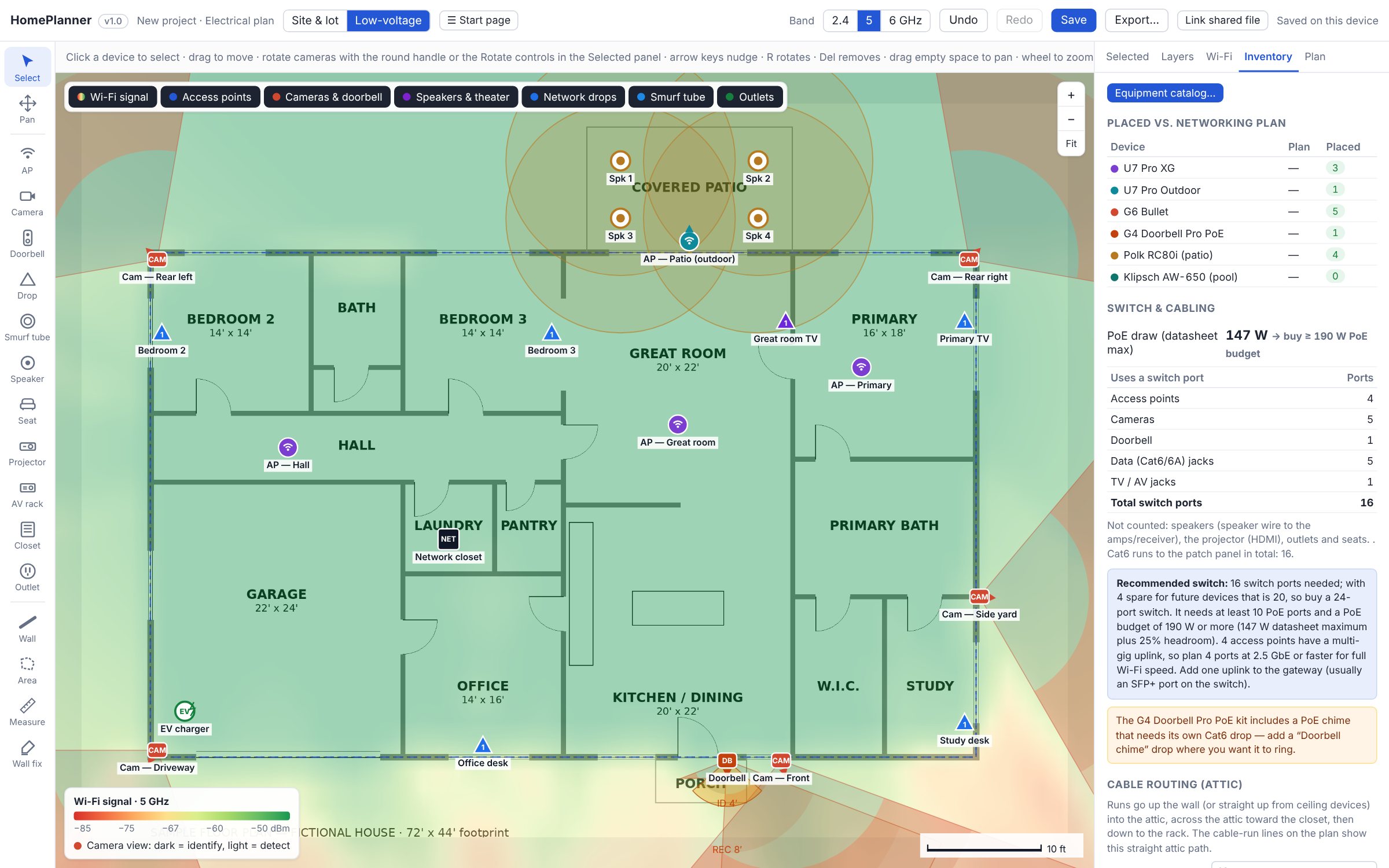
The Lot & Wire planner on a sample floor plan: Wi-Fi coverage, cameras, doorbell, network drops, patio speakers, the network closet and a recommended switch size.
Low-voltage view of a sample house (fictional): Wi-Fi coverage, cameras, drops, speakers, the network closet and the recommended switch.

How it works

Start outside, then work your way in. Most low-voltage decisions get made in a rush at the pre-drywall walkthrough. Do it calmly at home instead, with your actual plans.

1

Place the house on the lot

Enter the address and upload the builder's site plan. Lot lines come from public parcel records (built in for Texas), and the plan is lined up on a satellite map.

  • Position and rotate the house within the setbacks
  • Add the pool, spa, septic field and tank, well and propane
  • Check the sun path and shade for the patio and windows
  • Plan the landscaping from your HOA's plant list
2

Then plan the low-voltage inside

Upload the floor plan, set its scale, and place your equipment room by room.

  • Wi-Fi access points with a live coverage map
  • Cameras and doorbell with their real field of view
  • Network drops, TV locations and the network closet
  • Speakers, home theater, smurf tube and extra outlets
Low-voltage view of a sample floor plan with Wi-Fi coverage, cameras, network drops, patio speakers, the network closet and a recommended switch size.
3

Hand your builder one clear report

Export a sectioned PDF, one uncluttered plan per trade, with schedules, cable-run estimates and the network closet marked on every page. Save the project file and keep editing as plans change.

What your builder gets

One PDF, split into sections so nobody has to decode a single crowded drawing:

  • Site plan: house, pool, septic and lot placement
  • Wi-Fi access points with coverage
  • Cameras and doorbell with aim and height
  • Speakers and home theater with wire runs
  • Network drops and a device schedule (also as CSV)
  • Outlets and dedicated circuits to request

And what you'll need to buy

The planner counts what your layout needs, so you can shop with confidence:

  • How many switch ports, and which size of switch to buy
  • How many PoE ports and how much PoE power
  • Which access points need multi-gig ports
  • Estimated Cat6 footage and home runs to the closet
  • Speaker wire gauge for each run

Your plans stay on your computer

Lot & Wire runs entirely in your browser. Uploaded site plans and floor plans aren't sent to us. Neither are your saved projects or reports, because we don't have a server that stores them. Save writes a project file to your own computer or shared folder. To find your lot, the address you type goes to public map and parcel services. Privacy details.

Questions

Is it really free?

Yes. Every feature is free with no account. A voluntary tip jar is coming for people who find it useful. Tips don't unlock anything.

Does it work outside Texas?

The low-voltage planner works anywhere. Automatic lot lines are built in for Texas. Elsewhere, you click the lot corners on the satellite map.

Can my spouse or partner edit the same plan?

Yes. Save the project file to a shared folder (Dropbox, OneDrive, Google Drive). In Chrome or Edge, "Link shared file" keeps both of you in sync. Each change saves into the file and loads on the other computer.

Does it replace my electrician or low-voltage contractor?

No. It helps you decide what you want and communicate it clearly. Your contractor and local building authority make the final calls on code, circuits and installation.

Which equipment does it know about?

It includes datasheet values for popular access points and cameras (UniFi, Reolink, and generic models), doorbells, and in-ceiling and outdoor speakers. You can also add your own models. Brand names belong to their owners. Lot & Wire isn't affiliated with any manufacturer.

Can I use it on a phone?

You can view plans on a phone. For placing and dragging devices, a computer or tablet works much better.

For planning only. Lot & Wire is not electrical, engineering, architectural or code-compliance advice. Verify every circuit, device location and cable run with a licensed electrician and your local building authority. See the Terms of Use.

Ready before your pre-drywall walkthrough

Open the planner, upload your plans, and have a clear layout for your builder in an evening.

Open the planner